
Using Modules and pip in Python (Pydroid 3)
Sometimes we have to use somone else’s for in our program , same like copying homework from your friend and why we do it, to save time the same thing works in Python 🐍 too.
Today, we will learn a technique to use code that is not stricken by us but will enhance the quality of our program, save time and energy , and of course no one is going to pusnish you because it’s legal and is free.
There are several ways to install pip packages on Pydriod 3. To access at the top left corner of the app. Next, to to pip. At the Pip page menu, select SEARCH LIBRARIES to get more options about the module you want to download and install for use.
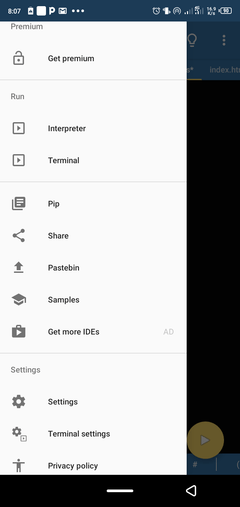
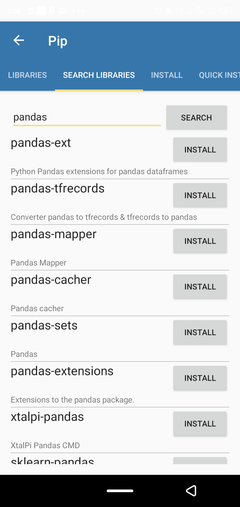
After downloading the package, now you can import it in your program by using import function.
There are two types of module in Python 🐍•Built in modules:
BUILT IN MODULES:
Built-in modules are pre-installed in Python, i.e., there is no need to download them. These modules come with the python interpreter itself. For example– random, os, etc.
To get a complete list of built-in modules of python, head over to the following page of the official documentation – https://docs.python.org/3/py-modindex.html.
EXTERNAL MODULES:
These are the modules that are not pre-installed in Python, i.e., we need to download them before using them in our program. For example:– Flask, Pandas, TensorFlow, etc.
You have install them using pip function which we have already discussed before.
That’s all about modules in Python 🐍,I hope you understood the concept of modules , we will use them in future when we have to make some complex programs.
 PythonPro🐍
One thought on “Module in PYTHON 🐍”